
Beating the intense heat and heavy humidity on a golf course requires more than just a cold drink and a wide-brimmed hat. A dedicated golf cart fan can transform your round from a grueling test of endurance into a comfortable, focused game. Choosing the right fan depends on two primary decisions: how you will power the device and how you will secure it to your cart.
If you own your golf cart and play regularly, a permanently wired 12-volt fan mounted to the overhead roll bar offers continuous, high-velocity cooling. For golfers who rent carts or travel between different courses, a portable, USB-rechargeable battery fan with a heavy-duty clip-on mount provides the ultimate flexibility. Solar-powered fans offer an eco-friendly alternative, using passive solar panels to extend battery life during long hours on sun-drenched fairways. By matching these power sources and mounting styles to your specific playing habits, you can maintain a cool breeze from the first tee to the eighteenth green.
Quick Selection Guide: Matching Power and Mounts
To help you quickly identify the best configuration for your rounds, the table below maps the primary power sources and mounting options to their ideal golfing scenarios, installation requirements, and typical price ranges in the local market.
Products mentioned in this guide
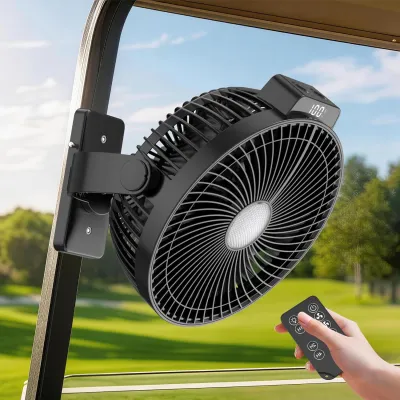
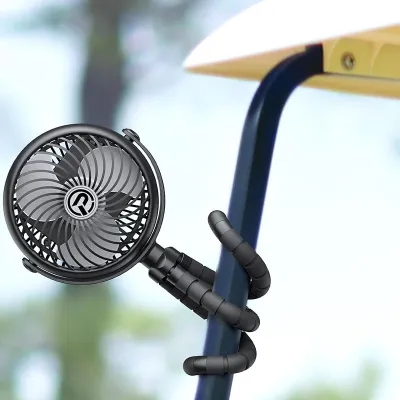
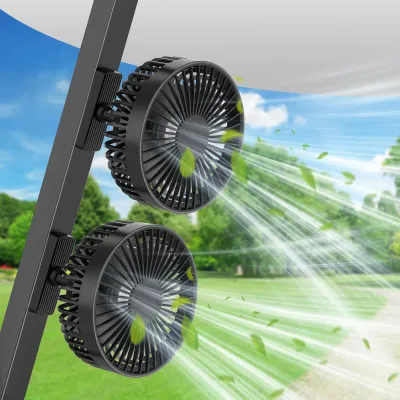

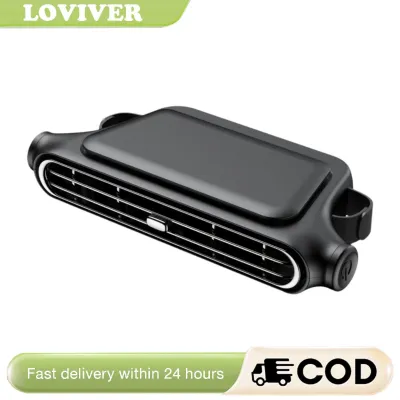
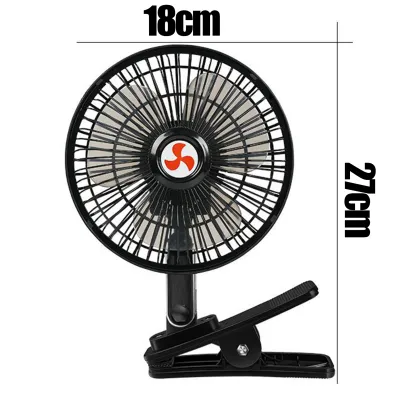
Prices are valid at publication and may change. Please refer to the product page for the latest price.
| Power Source | Mounting Style | Best Suited For | Key Advantage | Installation Effort | Price Bracket |
|---|---|---|---|---|---|
| 12V Wired | Overhead / Roll Bar | Custom cart owners, frequent club players | Continuous high power, no recharging needed | Moderate (requires wiring/voltage reducer) | Mid-range to Premium (₱2,500 – ₱5,000+) |
| Battery-Powered | Clip-On / Cup Holder | Weekend renters, travelers, multi-sport users | Maximum portability, zero-tool setup | None (instant clamp or freestanding placement) | Budget to Mid-range (₱800 – ₱2,500) |
| Solar-Assisted | Canopy / Dashboard | Eco-conscious players on open, sunny courses | Extended runtime via passive solar charging | Low to Moderate (bracket or strap mount) | Mid-range (₱1,500 – ₱3,500) |
Selecting the perfect setup requires balancing your cart ownership status with how much effort you want to spend on installation and maintenance. While a wired system provides unmatched reliability, portable battery-operated units ensure you are never left sweltering in a rental cart.
Choosing by Power Source: 12V, Battery, and Solar
The power source determines not only how long your fan will run but also how much preparation is required before you head out to the course. Understanding the electrical demands and limitations of each type will prevent unexpected power failures mid-round.

12V Wired Fans (Direct Cart Power)
Wired 12-volt (12V) fans connect directly to your golf cart’s electrical system, drawing energy from the main battery bank. The primary advantage of this setup is uninterrupted, high-velocity airflow. Because the fan relies on the cart’s substantial battery capacity, you never have to worry about recharging a separate device or having the breeze die out during a long, slow-moving round on a crowded weekend.
However, installing a 12V fan requires careful attention to electrical specifications. Most modern electric golf carts operate on 36-volt or 48-volt battery systems. Connecting a 12V fan directly to a 36V or 48V battery pack will instantly destroy the fan’s motor and presents an electrical fire hazard. To safely install a 12V fan on these carts, you must use a voltage reducer (sometimes called a DC-to-DC converter) to step down the voltage to a safe 12V level. Always consult your golf cart’s user manual and the fan manufacturer’s wiring instructions before attempting installation. If you are uncomfortable splicing wires, routing cables, or installing inline safety fuses, seek the assistance of a qualified golf cart technician.
Battery-Powered Fans (Rechargeable/Portable)
For the vast majority of recreational golfers, rechargeable battery-powered fans represent the most convenient and versatile option. Typically powered by internal lithium-ion batteries, these fans charge via standard USB ports, making them incredibly easy to prep at home or in your car on the way to the club. They require absolutely no integration with your golf cart’s wiring, eliminating any risk of damaging the vehicle’s electrical system.
The main trade-off with battery-powered fans is runtime management. A fan running at maximum speed in sweltering tropical heat will deplete its battery much faster than one running on a low, gentle setting. When shopping for a rechargeable model, verify the manufacturer’s battery capacity rating, usually measured in milliampere-hours (mAh). Look for capacities of at least 5,000 mAh to 10,000 mAh to ensure the fan can run continuously for 4 to 8 hours on medium-to-high settings. Keep in mind that actual performance depends heavily on the fan’s motor efficiency and speed selection, so it is wise to charge the unit fully before every round.
Solar-Powered Fans
Solar-powered golf cart fans utilize integrated photovoltaic panels to capture sunlight and convert it into electrical energy. This eco-friendly design is highly appealing for golfers playing in the bright, open fairways typical of tropical climates. Ideally, a solar fan charges itself passively while your cart is parked in the sun, reducing your reliance on wall outlets and ensuring a continuous breeze on long summer days.
Before choosing this option, it is crucial to understand the functional limits of small solar panels. Most portable solar panels included with golf cart fans do not generate enough immediate wattage to run a high-velocity motor at full speed on solar power alone. Instead, they act as trickle chargers, slowly replenishing the fan’s internal battery to extend its overall runtime. Performance is highly dependent on direct sunlight; if you play on heavily wooded courses with significant canopy shade, or during the overcast conditions of the rainy season, the solar charging rate will drop significantly. For the best results, treat solar power as a helpful runtime extender rather than your sole energy source.
Choosing by Mounting Style: Overhead, Dash, and Clip-On
How you mount your fan dictates where the airflow is directed, how much vibration the unit will endure, and whether the installation will cause permanent changes to the cart.
Roll Bar and Canopy Mounts
Overhead mounting involves securing the fan to the vertical roll bars or the horizontal metal frame supporting the cart’s canopy roof. This position mimics a ceiling fan, distributing a broad, downward cone of air that cools both the driver and the passenger simultaneously. By placing the fan overhead, you keep your dashboard completely clear, preserving storage space for golf balls, tees, scorecards, and drinks.
Most overhead systems use heavy-duty metal clamps, adjustable u-bolts, or high-strength hook-and-loop straps to wrap tightly around the square or round tubing of the cart’s frame. Before purchasing, use a caliper or tape measure to verify the outer diameter of your cart’s roll bars, as clamp sizes can vary. Additionally, ensure the mounting hardware is robust enough to handle the weight of the fan. Golf carts frequently travel over bumpy turf, tree roots, and paved cart paths; a weak overhead mount can slip, causing the fan to sag or fall, which poses a safety hazard to passengers.
Dashboard and Steering Column Mounts
Dashboard and steering column mounts place the fan directly in front of you, delivering concentrated, high-impact airflow straight to your face and chest. This direct cooling is incredibly refreshing when you return to the cart after walking a long fairway in high humidity. These fans typically secure to the dash using heavy-duty suction cups, semi-permanent adhesive pads, or bolt-on brackets that screw directly into the plastic dashboard console.
While front-facing mounts offer excellent personal cooling, they do come with distinct limitations. A dashboard-mounted fan occupies valuable space and can partially obstruct your forward visibility or block access to storage cubbies and cup holders. Furthermore, the intense heat inside a parked, uncovered golf cart can cause adhesive pads to soften and fail over time. Suction cups may also lose their seal when exposed to rapid temperature changes or fine dust from the course. If you opt for a dashboard mount, look for mechanical clamp or bolt-on options to ensure the fan remains securely anchored.
Clip-On and Freestanding Options
If you do not own your golf cart, non-permanent mounting styles are essential. Clip-on fans feature a spring-loaded, heavy-duty clamp at the base, allowing you to attach the fan to almost any flat or tubular surface on the cart, such as the roof support struts, the seat frame, the dashboard lip, or even the side of your golf bag. Freestanding models are designed to sit securely inside a standard cup holder or on the floorboard of the cart.
The primary advantage of these options is absolute flexibility. You can attach, adjust, and remove the fan in seconds without leaving any scratches, sticky residue, or drill holes behind—a critical requirement for rented carts where modifications are strictly prohibited. When choosing a clip-on fan, check the maximum jaw opening of the clamp to ensure it can grip the thickest part of the cart’s frame. Look for clamps lined with textured rubber pads; these provide crucial friction to prevent the fan from vibrating loose or spinning out of position as you drive over uneven terrain.
Essential Specs to Check for Tropical and Humid Conditions
The tropical climate of the Philippines presents unique challenges for outdoor electronics. High humidity, intense UV exposure, and sudden torrential downpours require a fan built for durability and performance rather than basic indoor use.
- Airflow and Blade Design: In humid conditions, sweat does not evaporate easily from your skin, making ambient air feel much hotter. To feel a genuine cooling effect, you need high-velocity airflow. Look for fans that specify their airflow volume, often measured in cubic feet per minute (CFM). A fan with multiple speed settings allows you to conserve battery on cooler mornings and blast high-velocity air during the midday heat. An automatic oscillation feature or a dual-head design is also highly beneficial, as it distributes air across both seats rather than focusing on a single spot.
- Noise Levels: While you want maximum airflow, you do not want a noisy motor disrupting your concentration, your partner's swing, or the quiet etiquette of the golf course. Look for fans equipped with brushless DC motors. These motors are not only more energy-efficient, extending battery life, but they also operate much more quietly than traditional brushed motors. Check product specifications for decibel (dB) ratings; a noise level below 50 dB at medium speed is generally quiet enough to blend into the natural background sounds of the course.
- Weather and Humidity Resistance: Golf cart accessories are constantly exposed to the elements. High humidity can accelerate rust on internal metal components, while sudden tropical rain showers can cause electrical shorts in unsealed housings. Prioritize fans with water-resistant ratings, such as IPX4, which indicates protection against water splashes from any direction. Ensure the outer shell is made of UV-resistant ABS plastic to prevent the casing from becoming brittle and cracking under intense sunlight, and look for rust-resistant stainless steel mounting hardware. Always refer to the manufacturer's care instructions regarding wet weather exposure, and store portable fans indoors when not in use.
- Adjustability and Pivot Range: The angle of the sun changes constantly throughout a four-hour round, and so will your cooling needs. A fan with a 360-degree pivoting head and multi-directional tilt adjustments allows you to quickly redirect the airflow without having to unmount or reinstall the entire unit. High-quality ball joints or locking pivot knobs are essential to keep the fan head from drooping when the cart vibrates on bumpy cart paths.
Recommended Setups Based on Your Golfing Routine
To simplify your buying decision, match your specific playing style and cart ownership status to one of these three recommended configurations.
- The Cart Owner / Daily Player: If you keep a personal golf cart parked at your home club or garage, invest in a permanent setup. Pair a heavy-duty 12V wired fan with a secure roll bar or canopy mount. This configuration provides maximum, continuous airflow that turns on automatically with your cart's ignition. It eliminates the daily chore of bringing a fan home to charge, ensuring your cart is always ready for a comfortable round.
- The Weekend Renter / Traveler: If you primarily rent carts from different clubs or travel to various courses, choose a high-capacity battery-powered fan (10,000 mAh) with a rugged clip-on mount. This portable setup gives you reliable, high-velocity cooling that you can clamp onto any rental cart in seconds. When your round is finished, simply unclip the fan, toss it in your golf bag, and recharge it at home via USB.
- The Eco-Conscious Cruiser: If you play primarily on wide-open, sun-drenched courses and want to minimize your carbon footprint, opt for a solar-assisted battery fan paired with a canopy or dashboard mount. The integrated solar panel will continuously trickle-charge the battery while you play, extending your cooling relief through extra-long rounds or back-to-back games on bright summer days.
Frequently Asked Questions (FAQ)
Can I use a regular household fan in my golf cart?
No, using a standard household fan in a golf cart is highly inefficient and poses safety risks. Household fans run on alternating current (AC) electricity, typically requiring 220 volts. Golf carts operate on direct current (DC) battery systems (usually 12V, 36V, or 48V). Attempting to run a household fan requires a power inverter to convert DC to AC, which drains your cart’s batteries rapidly and introduces complex wiring hazards. Furthermore, household fans are not built to withstand the intense vibrations, dust, humidity, and potential water exposure of an outdoor golf course. It is always safer and more efficient to use a purpose-built 12V DC or portable battery-operated golf cart fan.
Will a 12V fan drain my golf cart battery if left on?
Yes, any 12V accessory wired directly to your golf cart’s battery system will slowly drain power if left running when the cart is parked. To prevent a dead cart battery, it is highly recommended to wire the fan through a switched circuit connected to the cart’s key switch. This ensures the fan automatically powers down when the ignition key is turned off. If your fan is wired directly to the battery block, always install an easily accessible inline toggle switch or manual dial, and make it a habit to double-check that the fan is completely turned off before leaving your cart in the staging area or garage.
Community discussion
Share your experience or ask a question. Comments are reviewed before publication.