
Jogging along the active streets of Bonifacio Global City, the scenic paths of UP Diliman, or the quiet roads of your local barangay requires a reliable way to carry your mobile device. In the Philippines, where high humidity and sudden tropical downpours are constant factors, finding the right phone holder is not just about convenience—it is about protecting your expensive device and ensuring your running form remains natural and injury-free. A poorly chosen holder can lead to painful skin chafing, restricted blood circulation, or even a dropped and shattered screen.
To make an informed decision, you must evaluate how different carrying methods interact with your body type, running style, and the specific dimensions of your phone. The ideal “cp holder for jogging” must withstand heavy perspiration, minimize high-impact bounce, and remain comfortable over long distances. By understanding the core criteria of stability, material breathability, and accessibility, you can select a gear setup that seamlessly integrates into your daily running routine without causing distraction or discomfort.
Core Criteria for Evaluating Jogging Phone Holders
When evaluating any phone holder designed for running, stability is your primary defense against distraction and physical discomfort. High-impact movement creates significant vertical and lateral forces with every stride, causing unsecured devices to bounce violently. This constant movement not only pulls on your clothing but can also lead to bruising or skin irritation over longer distances. To mitigate this, look for holders that feature wide, supportive bands, high-tension elastic materials, or compression fits that lock the device flat against your body’s center of gravity.
Products mentioned in this guide
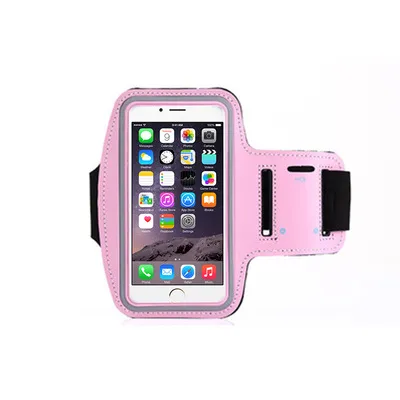
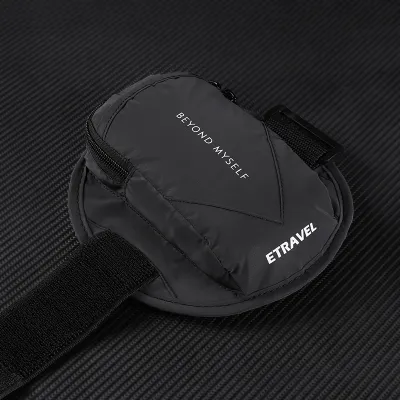
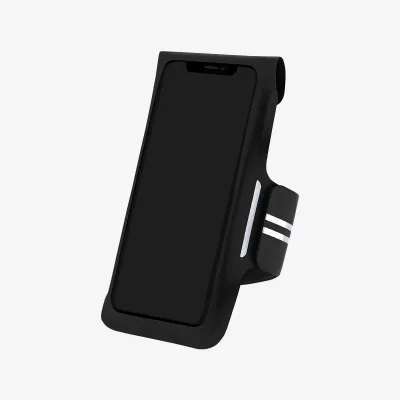
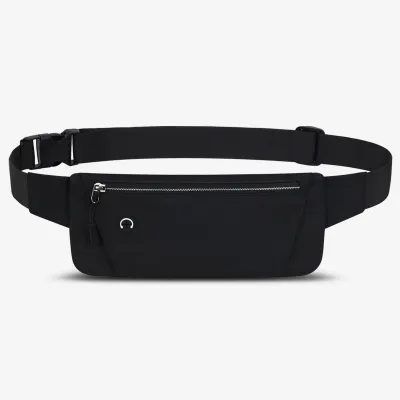
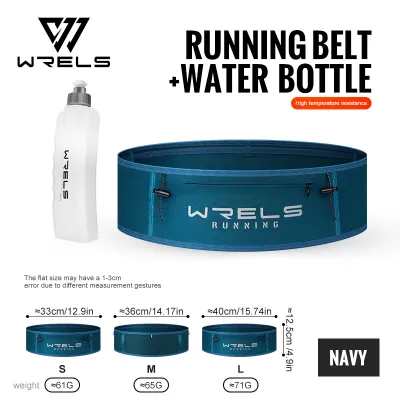
Prices are valid at publication and may change. Please refer to the product page for the latest price.
Sweat resistance and breathability are critical considerations in hot and humid tropical climates. Heavy perspiration can quickly saturate standard fabrics, leading to moisture seeping into your phone’s ports or causing the holder’s strap to slip down your arm or waist. Materials such as neoprene, treated Lycra, and lightweight nylon mesh are commonly used to manage moisture. Neoprene provides a solid barrier against sweat but can trap heat against your skin, while open mesh panels promote airflow and quick drying at the expense of direct water protection.
Accessibility requirements vary depending on how you use your phone during a run. If you frequently check your running application, skip music tracks, or need to be reachable for emergency calls, a holder with a clear, touch-sensitive plastic window or a quick-release mount is essential. However, if you prefer an uninterrupted run where your phone simply records data in the background, a fully enclosed, low-profile pouch that prioritizes security and weather protection over instant screen access is often the more comfortable choice.
Weight distribution and chafing prevention are directly tied to where the holder contacts your body. Heavy modern smartphones, especially when housed in rugged protective cases, create localized pressure points that can rub against your skin as you move. To prevent painful chafing, examine the construction of the holder for flat-lock seams, soft-bound edges, and the absence of exposed plastic buckles or harsh velcro edges that could make direct contact with your skin or snag your running apparel.
Comparing the Main Types of Running Phone Holders
Different phone holder designs distribute weight across your body in distinct ways, directly affecting your running mechanics and comfort. The choice between an arm, waist, hand, or torso placement involves balancing how much bounce you can tolerate against how easily you need to access your screen. Understanding these structural differences allows you to match the holder’s mechanics to your specific running style and distance goals.

While some runners prioritize absolute security and weather protection, others require quick accessibility for navigation or safety. No single design excels in every category, meaning your selection will ultimately depend on which trade-offs align best with your training environment and physical comfort.
Arm Bands and Sleeve Holders
Arm bands and compression sleeves are among the most common solutions for carrying a phone while jogging. Traditional arm bands use an adjustable strap, typically secured with velcro, to wrap around your upper bicep. Compression sleeves, on the other hand, slide up your arm and rely on the elastic tension of the fabric to hold the device flat against your forearm or upper arm. The primary advantage of this placement is that it keeps the phone away from your torso, leaving your waist and hips completely free of restriction.
However, arm-mounted holders present unique challenges regarding strap elasticity and slippage. As your muscles contract and relax during a run, a rigid strap can feel overly tight, while a loose strap will inevitably slide down toward your elbow due to the weight of the phone and the lubrication of your sweat. Over time, exposure to salt from perspiration can degrade velcro hooks, reducing the holding power of the strap. Additionally, accessing a phone enclosed in an arm band usually requires stopping your run or awkwardly twisting your head, and the clear plastic covers can lose touch sensitivity when coated in sweat or humidity.
From a physical comfort perspective, overtightening an arm band to prevent slippage can restrict blood flow, lead to muscle fatigue, or cause temporary nerve compression. Runners with sensitive skin may also experience chafing where the edges of the band rub against the inner arm during the forward and backward arm swing. If you choose an arm band, look for models with wide, perforated straps that distribute pressure evenly and allow heat to escape.
Waist Belts and Running Pouches
Waist belts and running pouches position the weight of your phone close to your body’s natural center of gravity, making them highly effective at minimizing the sensation of carrying extra weight. These holders generally fall into two categories: elastic tube-style belts that you slide over your feet and pull up to your hips, and traditional zippered pouches that secure with an adjustable strap and buckle. By keeping the phone snug against your lower back or pelvis, waist belts significantly reduce vertical bounce compared to arm-mounted options.
To prevent a waist belt from sagging or riding up to your narrower natural waistline—which causes the phone to bounce against your stomach—proper positioning is essential. The belt should sit low on your hips, resting on the pelvic bones where the body’s circumference remains relatively constant. For larger, heavier smartphones, tube-style belts with wide, continuous elastic bands are particularly effective because they distribute the device’s weight across a broader surface area, preventing the localized sagging common with narrow-strapped zippered pouches.
While waist belts offer excellent stability and often include extra storage space for keys, energy gels, or cash, they do limit on-the-go accessibility. Retrieving your phone from a snug waist pouch while maintaining your running stride can be difficult and may require you to slow down or stop. Furthermore, in hot weather, a wide waist belt can create a warm zone around your midsection, increasing sweat accumulation where the fabric contacts your lower back.
Handheld Straps and Grip Bands
Handheld phone holders use an ergonomic strap or glove-like band that secures the device directly to your palm, eliminating the need to grip the phone tightly with your fingers. This design is favored by runners who want instant, unrestricted access to their screen for taking photos, checking maps, or adjusting running apps. Because the phone is always in your hand, there are no straps around your limbs or torso to cause chafing or restrict breathing.
Despite the convenience of instant access, carrying a phone in your hand over long distances can negatively impact your natural running form. Adding weight to one side of your body can cause asymmetrical arm swing mechanics, leading to shoulder tightness or muscle imbalances over time. Your hand and forearm muscles must also maintain a baseline level of tension to support the device, which can result in grip fatigue and stiffness during extended runs.
Safety is another critical consideration for handheld holders. In the event of a trip or fall, having a device strapped to your hand can interfere with your natural instinct to break your fall, potentially leading to wrist injuries or a severely damaged phone. If you prefer a handheld option, look for models with soft, moisture-wicking hand straps that allow your fingers to remain completely relaxed, and ensure the holder features robust corner bumpers to protect the device from accidental drops.
Hydration Vests and Shorts with Built-in Pockets
For long-distance runners, trail joggers, or those carrying multiple items, integrated storage solutions like hydration vests and running shorts with built-in phone pockets offer excellent weight distribution. Hydration vests feature dedicated chest pockets positioned high on the sternum, keeping the phone’s weight close to your spine and minimizing bounce during high-impact strides. This placement also keeps the phone easily accessible while keeping it elevated away from the heavy sweat zones of your lower waist.
Running shorts with built-in compression liners often feature integrated phone pockets located on the side of the thigh. This design utilizes the natural compression of the inner short to hold the phone firmly against your quadricep, preventing any vertical or lateral movement. Because the thigh muscle is large and stable, you will barely feel the weight of the phone as you run, making this one of the most comfortable options for runners who dislike straps and belts.
The primary limitation of these integrated systems is compatibility with oversized phone models or bulky, rugged protective cases. A pocket designed for a standard-sized phone may stretch excessively or fail to accommodate a larger device, putting seams under high tension and risking fabric tears. Additionally, adding a heavy phone to a lightweight pair of running shorts can sometimes pull the waistband down if the internal drawstring is not tied securely.
Sizing, Fit, and Device Compatibility Checks
Before purchasing any phone holder, you must verify that your specific device will fit securely inside the pocket or mount. Do not rely solely on the manufacturer’s advertised screen size compatibility (such as “fits up to 6.7-inch phones”), as these measurements rarely account for the added bulk of protective cases. Use a ruler or tape measure to find the exact length, width, and thickness of your phone while it is inside its daily protective case, and compare these dimensions directly against the internal pocket measurements provided by the holder’s manufacturer.
Strap lengths and pocket stretch limits must also be checked against your physical measurements. For arm bands, measure the circumference of your bicep both when relaxed and when fully flexed to ensure the strap falls comfortably within the manufacturer’s adjustment range. For waist belts, measure your hip circumference at the exact point where you plan to wear the belt, keeping in mind that elastic materials will stretch but should not be tensioned to their absolute limit, as this can cause the fabric to degrade prematurely and restrict your breathing.
Finally, verify that the holder allows proper clearance for any physical connections you rely on during your runs. If you use wired earphones, check that the holder features aligned port cutouts that match your phone’s headphone jack or charging port. Even if you use wireless Bluetooth earbuds, ensuring that these port openings are present can assist with heat dissipation and allow you to connect a portable power bank if you are tracking an exceptionally long endurance run.
Pre-Run Security and Comfort Testing Protocol
To avoid discovering fit issues or chafing points kilometers away from home, always perform a systematic testing protocol in a controlled environment before committing to a long jog. Start by placing your phone inside the holder and securing it to your body exactly as you would for a run. Stand in place and perform a basic “jump and shake” test: jump up and down continuously for thirty seconds, then jog in place while lifting your knees high. Pay close attention to any vertical slipping, lateral shifting, or internal movement of the phone within the pocket.
Next, simulate the physical conditions of a humid run to evaluate how the materials perform when wet. You can apply a small amount of water to your skin where the holder makes contact to see if the strap loses grip or if the fabric begins to rub uncomfortably. Walk around your home for ten to fifteen minutes while wearing the holder, paying attention to any signs of skin irritation, redness, or localized pressure points along the seams and buckles.
Finally, adjust the tension of the straps to find the optimal balance between security and healthy blood circulation. An arm band or waist belt should be snug enough to prevent movement, but you should always be able to comfortably slide two fingers flat beneath the strap. If you experience any tingling, numbness, coldness in your fingers, or restriction in your breathing, loosen the holder immediately and re-evaluate the fit or placement.
Purchasing Considerations and Return Policies
When shopping for a phone holder on online marketplaces or from local sports retailers, reading user reviews with a critical eye can save you from purchasing an unreliable product. Look specifically for feedback from runners who mention long-term durability, bounce control, and how the materials hold up after multiple washes. Pay attention to comments regarding seam strength and velcro longevity, as these are the most common failure points on budget-friendly running gear.
Because fit is highly personal, prioritize purchasing from sellers who offer clear return and exchange policies. If you receive a waist belt that rides up or an arm band that pinches your skin, you should be able to exchange it for a different size or style without hassle. Keep the original packaging intact and avoid removing product tags until you have completed your home testing protocol and are fully satisfied with the fit.
Lastly, verify any material claims and water-resistance ratings against the physical product labels once your order arrives. If a product is advertised as waterproof, look for specific details such as water-resistant zippers, internal TPU coatings, or IPX ratings on the packaging. Remember that water-resistant materials are designed to repel light rain and sweat, but they may not protect your device during a severe tropical downpour, which may require placing your phone inside a simple zip-top plastic bag before inserting it into the holder.
Frequently Asked Questions (FAQ)
Can I use a regular waist bag instead of a dedicated running belt?
While a regular waist bag or casual fanny pack can physically hold your phone, they are generally not designed to handle the high-impact forces of jogging. Casual bags typically feature wide, non-elastic straps and heavy plastic buckles that bounce, sag, and shift as you run, leading to severe chafing and an uneven stride. Dedicated running belts utilize highly elastic, snug-fitting bands that compress the phone flat against your hips, distributing the weight evenly and eliminating the vertical movement that causes discomfort.
Will a waterproof phone holder trap heat and damage my device?
Yes, fully enclosed waterproof holders made of non-breathable materials like thick plastic or heavy neoprene can trap the heat generated by your phone’s processor and battery. When used under direct sunlight in high tropical temperatures, this lack of ventilation can cause your device’s internal temperature to rise rapidly, potentially leading to system slowdowns, battery degradation, or automatic thermal shutdowns. To prevent this, avoid leaving your phone screen turned on inside an enclosed pocket, and remove the device from the holder immediately if you notice it feels unusually hot to the touch.
How do I clean a sweaty running phone holder to prevent odors?
To maintain hygiene and preserve the elasticity of your running phone holder, hand-wash it regularly using cool water and a small amount of mild liquid detergent. Avoid using harsh chemical bleach, fabric softeners, or hot water, as these can break down the elastic fibers, delaminate waterproof coatings, and weaken velcro attachments. After washing, gently squeeze out excess water without wringing the fabric, and hang the holder to air-dry in a well-ventilated indoor area away from direct sunlight and high-heat sources like clothes dryers.
Community discussion
Share your experience or ask a question. Comments are reviewed before publication.