
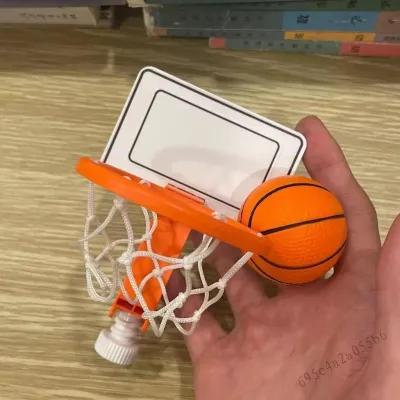
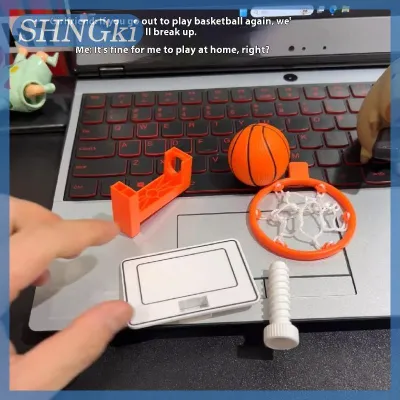
Finding the right mini desktop basketball hoop for a Philippine office environment requires balancing personal stress relief with workplace etiquette. The ideal setup features a quiet foam ball, a sturdy mounting system that will not damage office furniture, and a compact footprint that fits within your desk space. By focusing on noise-reduction features and secure mounting options, you can enjoy quick mental breaks without disrupting your colleagues in a shared workspace.
Core Benefits of Desk Basketball for Stress Relief
Taking quick physical micro-breaks during a demanding workday is an effective way to manage stress and maintain high cognitive performance. In fast-paced office environments, from high-pressure BPO hubs to corporate offices in Metro Manila, mental fatigue can accumulate rapidly. Shifting your focus away from a glowing monitor to aim a small ball at a hoop engages your brain in a completely different way, allowing your analytical mind to rest and reset.
This brief physical activity leverages the psychology of hand-eye coordination. When you focus on the trajectory of a shot, you practice a form of active mindfulness that redirects nervous energy. Instead of tapping your fingers on the desk, clicking a pen, or pacing around the room, a quick shoot-around provides a constructive outlet for physical restlessness. This physical redirection breaks the cycle of cognitive fatigue, helping you return to your tasks with renewed clarity.
Products mentioned in this guide
Prices are valid at publication and may change. Please refer to the product page for the latest price.
Furthermore, engaging with a physical toy helps combat the eye strain associated with staring at screens for hours on end. Following the 20-20-20 rule—looking at an object at least 20 feet away for 20 seconds every 20 minutes—is much easier when you have a physical target like a mini hoop mounted across your cubicle or office space. This simple change in focal distance relaxes the ciliary muscles in your eyes, reducing headaches and physical discomfort by the end of the day.
To ensure this activity remains a positive addition to your routine, it is important to set personal boundaries. A desk hoop should serve as a quick, two-minute mental reset rather than a prolonged distraction. By keeping your play sessions brief and intentional, you can enjoy the stress-relieving benefits of physical play without letting it interfere with your daily productivity or professional responsibilities.
Essential Features for an Office-Friendly Mini Hoop
When selecting a mini desktop basketball hoop for a shared workspace, noise reduction and durability are your primary concerns. The materials used in the construction of the backboard play a significant role in how much sound is generated during play. Shatterproof polycarbonate backboards are highly durable and absorb impact energy well, resulting in a lower-pitched, less disruptive sound when the ball hits the board. In contrast, cheap molded plastic backboards tend to be thin and brittle, producing a loud, high-pitched clattering noise with every shot.

Rim construction also directly affects the noise level of your setup. A spring-loaded breakaway rim acts as a mechanical shock absorber, converting the kinetic energy of the ball into spring movement rather than acoustic vibration. This design significantly dampens the thudding sound that would otherwise travel through the mounting surface and vibrate your desk or wall. Rigid metal or plastic rims, which lack this spring mechanism, transfer the full force of the impact directly to the mounting structure, creating a loud, distracting noise for nearby coworkers.
Perhaps the most critical component for an office-friendly setup is the type of ball you use. Traditional mini basketballs made of inflatable rubber are entirely unsuitable for an office environment. They bounce loudly off the backboard, desk, and floor, creating an disruptive racket and posing a risk to nearby equipment. High-density foam balls are the industry standard for indoor office play. These balls compress silently upon impact, virtually eliminating the sound of shots while protecting computer monitors, glass partitions, and desk organizers from accidental damage.
Additionally, consider the overall build quality of the net. Nylon nets are common and durable, but they can make a distinct whipping sound when a shot goes through. If you want to minimize noise even further, look for nets made of softer, thicker cotton threads, which tend to muffle the sound of a successful shot. Ensuring that every component of the hoop is optimized for quiet operation will allow you to enjoy your breaks without causing friction in your workplace.
Mounting Options and Desk Stability
Choosing the right mounting method is essential for keeping your mini hoop secure and preventing damage to your office furniture. Over-the-door mounts are a popular choice for individual cubicle partitions or private office doors. These models typically feature hooks that hang over the top of the door or partition wall. To prevent rattling and protect the wood or paint, look for hooks lined with thick foam padding. This padding absorbs vibrations and keeps the bracket from sliding around during play.
Desk-clamp mounts attach directly to the edge of your desk, keeping the hoop within arm’s reach. These systems offer excellent stability and are ideal for open-plan offices where door mounting is not an option. Before purchasing a clamp-on model, you must measure the thickness of your desk edge and verify the material. Hollow-core desks or those made of thin particle board with cheap laminate can crack under concentrated clamping pressure. Ensure the clamp has a wide pressure plate and protective rubber pads to distribute the force evenly and prevent surface scratches.
Freestanding bases sit directly on your desk surface, requiring no installation or mounting hardware. These models are highly portable and can be easily moved or stored in a drawer when not in use. However, they are prone to tipping over if the base is not sufficiently weighted. Look for freestanding models that feature heavy-duty metal bases or integrated suction cups. Suction cups work exceptionally well on smooth glass or polished laminate desks, providing a secure grip that resists the tipping forces of repeated shots.
In the Philippines, tropical humidity can also affect your mounting choice. Adhesive-based mounts, which rely on double-sided tape to stick to walls or monitors, frequently fail in humid conditions as the moisture degrades the adhesive backing over time. This can cause the hoop to fall unexpectedly, potentially damaging your desk items. Mechanical mounting options, such as padded clamps, weighted bases, or over-the-door hooks, are far more reliable and durable in local climate conditions.
Building Your Shortlist: What to Check Before Buying
When browsing online marketplaces for a mini desktop basketball hoop, you cannot physically test the product before purchasing. Therefore, you must rely on a systematic evaluation of product specifications and user feedback to find a high-quality, office-appropriate model. Start by reading user reviews critically, searching specifically for keywords like “loud,” “rattles,” “flimsy,” or “scratched.” Reviews from buyers who explicitly mention using the hoop in an office or cubicle are invaluable for assessing real-world noise levels.
Next, verify the exact dimensions of the backboard and the mounting base. A backboard that is too wide can block your dual-monitor setup, obstruct your desk lamp, or knock over your desk organizer. Measure your available desk clearance, including the vertical space below any overhead shelves or cabinets. Ensure that the hoop’s footprint fits comfortably within your workspace without forcing you to crowd your keyboard, mouse, or essential work documents.
Always check the product description to see exactly what is included in the package. Some budget-friendly options only include a hard plastic ball, which is too noisy for office use, meaning you will need to purchase a separate foam ball. Look for complete kits that include a high-density foam ball, a padded mounting bracket, and any necessary assembly tools. Purchasing a complete, high-quality kit saves you the hassle of sourcing compatible accessories later.
Finally, compare prices on local ecommerce platforms and factor in shipping costs. Prices typically range from ₱300 for basic plastic models to over ₱1,500 for heavy-duty polycarbonate setups with spring-loaded rims. Because backboards can be bulky, shipping fees can sometimes be high. Compare different sellers to find a balance between product quality, shipping rates, and delivery times, ensuring you get a reliable setup that fits your budget.
Setup, Safety, and Workspace Etiquette
Once you have selected and purchased your mini desktop basketball hoop, proper setup and safety precautions are essential for maintaining a professional and hazard-free workspace. Before taking your first shot, clear your desk of any fragile items, hot beverages, and important paper documents. A stray shot hitting a mug of hot coffee can lead to painful burns, ruined electronics, and a messy cleanup. Keep your immediate playing area clear of obstacles to ensure a safe and enjoyable experience.
Workspace etiquette is equally important when introducing a sports toy to a shared office. Even with a quiet foam ball and a padded mount, the physical action of shooting can still create minor vibrations and visual distractions. Coordinate with your immediate seatmates and establish clear boundaries. Avoid playing during peak meeting hours, client calls, or when your colleagues are deep in focused, high-concentration work. Respecting your coworkers’ need for quiet will ensure your new stress-relief tool remains welcome in the office.
Regular maintenance is also necessary to keep your hoop safe and functioning quietly over time. Periodically check the mounting brackets and tighten any screws that may have loosened from repeated use. Inspect the rim and backboard for any sharp plastic edges or cracks that could cause scratches or cuts. If your setup uses suction cups, wipe them down occasionally with a damp cloth to remove dust and maintain a strong grip against your desk surface.
If you find that your individual desk is simply too close to your colleagues for comfortable play, consider alternative setups. You might suggest mounting the hoop in a common area, such as the office pantry, break room, or a designated recreational zone. This allows everyone in the office to enjoy the benefits of quick physical breaks without compromising the quiet environment required for focused work at individual desks.
Frequently Asked Questions (FAQ)
Can a mini desktop basketball hoop damage my monitor or desk?
Yes, a mini hoop can cause damage if it is not set up and used correctly. Rigid rubber or hard plastic balls can easily crack or scratch a liquid crystal display (LCD) monitor if a shot goes wild. To prevent this, you should only use soft, high-density foam balls in an office environment. Additionally, ensure that any metal clamps or over-the-door hooks have thick foam padding on their contact points to prevent scratching, denting, or stripping the finish off your desk’s wood or laminate surface.
How do I clean and maintain a foam basketball?
Foam basketballs easily collect dust, lint, and natural oils from your hands in an office setting, which can make them dirty and less hygienic over time. To clean a foam ball, gently wipe the surface with a damp microfiber cloth and a small drop of mild dish soap. Avoid soaking the ball in water or using harsh chemical cleaners, as these can break down the foam structure and cause it to crumble. Allow the ball to air dry completely in a well-ventilated area before storing it back in your desk drawer.
Are there quieter alternatives to a mini basketball hoop for my desk?
If your office has an exceptionally quiet policy or if your desk setup is too cramped, a basketball hoop might still be too disruptive. Excellent low-noise alternatives for stress relief include miniature desk putting greens, magnetic dartboards with soft silicone darts, or silent mechanical fidget toys. These options provide a similar tactile break and hand-eye coordination focus without the risk of stray shots, vibrating backboards, or distracting visual movement in a shared workspace.
Community discussion
Share your experience or ask a question. Comments are reviewed before publication.